Pipeline Migration Assistant Deep Dive
)
CodeCargo makes it easy to migrate legacy pipelines to GitHub Actions
)
July 17, 2026
Most enterprise organizations have a large collection of legacy pipelines. They might be difficult to work with, but they get the job done. However, these pipelines are a major contributor to tech debt, especially in the DevOps space. Organizations often struggle migrating from these legacy pipelines to GitHub Actions for a variety of reasons, including: complexity, scale, impact, and knowledge gaps.
To put it more simply - organizations have thousands of legacy pipelines that deploy applications impacting the company's bottom line, with a limited number of engineers who actually understand how they work. From that perspective, it's quite clear why organizations have been putting off migrations for decades.
CodeCargo's pipeline migration assistant makes migrating these legacy pipelines to GitHub Actions cheap, simple, and easy.
How It Works
Pipeline Migration Assistant is a feature in CodeCargo platform. Using the assistant is simple - you just need a Jenkins or Azure DevOps environment with legacy pipelines to modernize and migrate to GitHub Actions.
Import Legacy Pipelines
To start your migration, first you need to import legacy pipelines. CodeCargo supports both Jenkins and Azure DevOps. For this blog post, I decided to use a Jenkins installation.
Importing your Jenkins pipelines is super easy. Here's what you do:
- Navigate to Migration Assistant, click on "import," then click on "Jenkins"
- Click the "generate an importer token" button
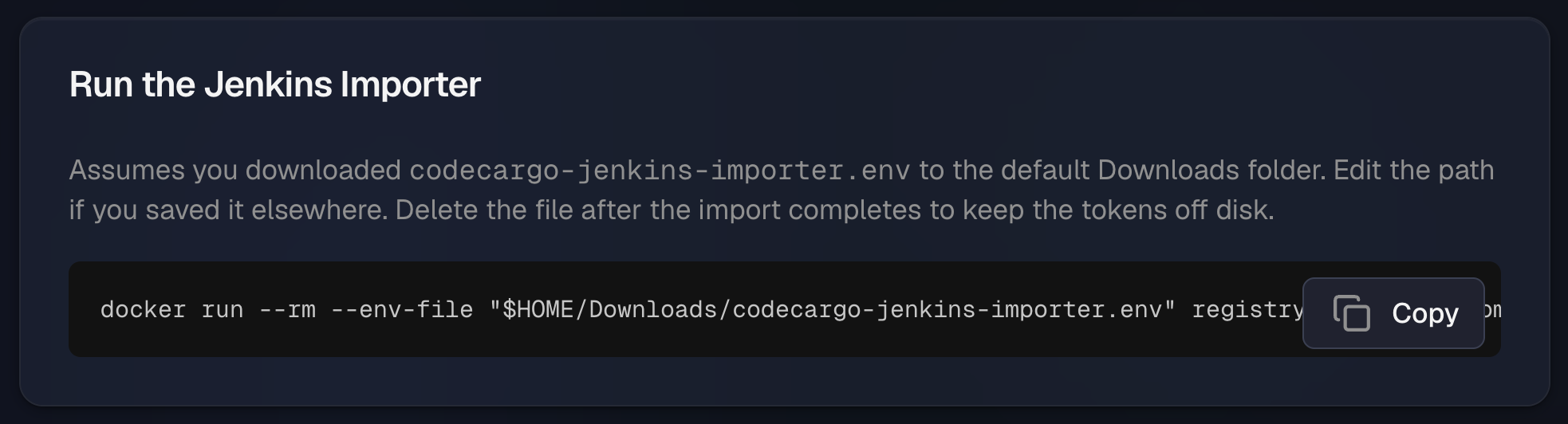
- Copy and run the provided
docker logincommand, and use the provided PAT for authentication - Download the provided Jenkins credentials file, and add your Jenkins url to
JENKINS_URL - Execute the provided
docker runcommand to import your Jenkins pipelines
- Jobs
- Functions
- Shared Libraries
- Plugins
- Credentials
- Folders
Note: we do not import the values of your credentials - we import their names and the platform will give you the ability to map that credential to a GitHub Secret to keep the migration seamless.
Here's what we import from Azure DevOps:
- Pipelines
- Templates
- Template Repositories
- Tasks
- Service Connections
- Projects
At this point, all of your Jenkins and/or Azure DevOps pipeline components are represented in the pipeline migration assistant.
We'll use a very simple pipeline to show how this works. Here's the source code, it deploys Kubernetes objects defined in a specified directory using a
kubeconfig file. stage('Deploy') { steps { withCredentials([string(credentialsId: 'prod-kubeconfig', variable: 'KUBECONFIG')]) { sh 'kubectl apply -f k8s/ --namespace=payments' } }}Deterministic and AI Analysis
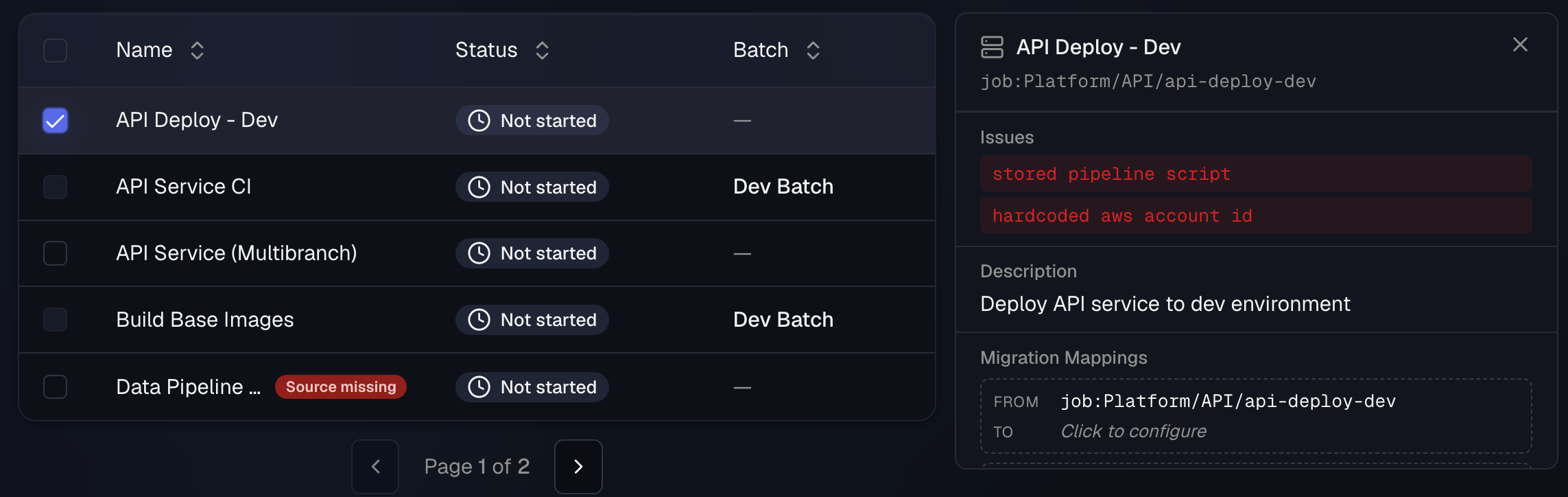
After you complete importing your legacy pipelines, the migration assistant will automatically run analysis on them. In particular, the pipeline migration assistant will determine the call structure, repository migration mappings, shared library / template usage, and other connections. In addition, our AI migration agent will analyze each pipeline to perform a best-practices analysis to identify any portions of the pipeline that would benefit from refactoring.
The output is a complete, normalized inventory of your pipeline estate before you touch anything. Import + analysis usually runs in an hour or two. Kick it off at the start of the day and it's typically done by lunch. For larger organizations with 1,000+ pipelines, it might take longer.
Migration Mappings and Batches
Now we're getting to the important pieces of the migration. Up to this point, everything has been a fully automated process. This is the stage where you define a lot of the modernization and standardizations for your migration.
Migration mappings is a fancy term to indicate what you want to do with a certain legacy pipeline component. For example, our pipeline is called
Platform/API/deploy-dev . When you migrate this pipeline, where should it go? There might be 1,000+ repositories in your GitHub organization - this allows you to decide which repository to migrate it to. This is an example of a migration mapping.Migration mappings include:
- Repositories for where to store your migrated pipelines
- Reusable workflows for multi-step golden paths, like a standard build, test, and deploy.
- Secrets and environments so credentials are mapped explicitly to GitHub Secrets, not copied forward as mystery strings.
- Building blocks are wrappers around reusable workflows and GitHub Actions
This stage of the migration is critical. The pipeline migration assistant is able to infer the majority of these mappings. It is your job to validate and refine the mappings so they make sense. In the case of our
API Deploy - Dev pipeline, here's how we mapped it in the platform: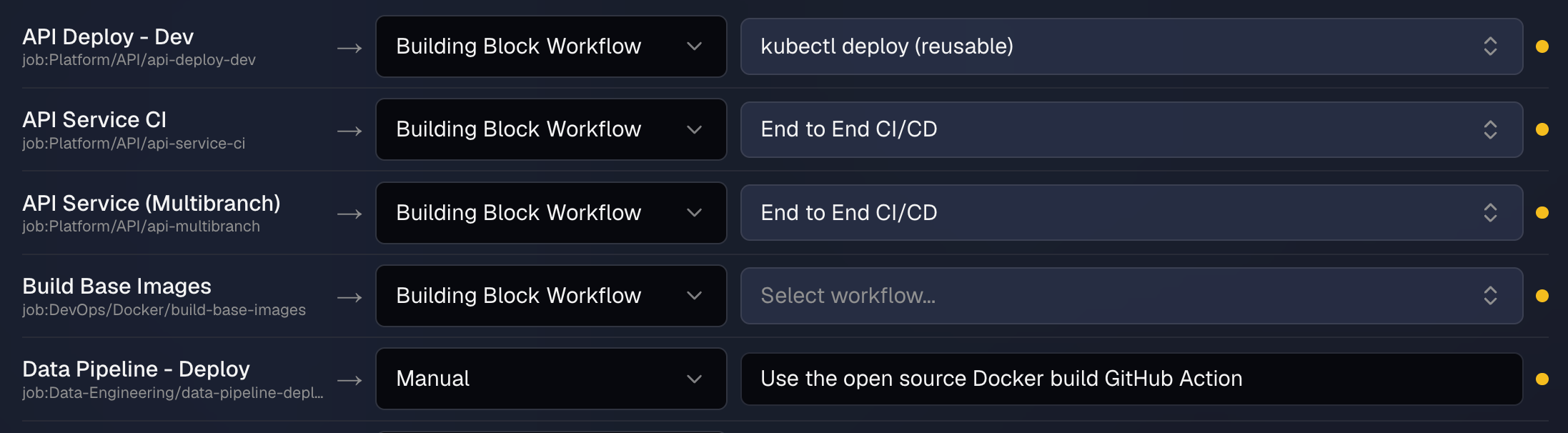
PROD_KUBECONFIG.Your organization might have 1,000 pipelines, but there are only 20-30 unique tasks (e.g., build a Docker image, create a ticket in Jira). To modernize your pipelines, create GitHub Actions and reusable workflows, then map your legacy pipelines so they use the shared code. The result is you still have 1,000 pipelines, but they each call one of your reusable workflows. This improves standardization, security, compliance, and governance.
It also makes it much faster to migrate your pipelines.
Execution: The Migration Agents
Now you run the migration, either as a big bang or in batches aligned to applications, teams, or business units. A big bang approach means you migrate everything at the same time. Using batches means you let teams decide when to start their migration. This is a more flexible option to allow for code freeze windows, downtime, etc
When you kickoff the migration, a dedicated AI agent will be assigned to each legacy pipeline. The agent also gets a dedicated sandbox environment with the following context:
- pipeline source code
- pre-migration analysis
- recommendations your team added
- migration mappings
The agent will begin the migration. Most of the time the agent is able to complete the migration on its own. However, sometimes it requires further input. In this situation, it will send a notification asking for a clarification. Notifications can be configured for Slack, email, or in the CodeCargo platform.
Inside the sandbox, the agent works the pipeline through to a finished change: it reads the source, resolves the building blocks it was mapped to, generates the GitHub Actions workflow, reviews its own output against your code standards and compliance guardrails, and opens a pull request.
Because every pipeline gets its own agent and sandbox, the migrations run in parallel across the batch. If you queue all of your organization's pipelines in a single batch, you might be done in just a few hours (assuming you can validate the new pipelines work that quickly).
Going back to our example Jenkins pipeline, here is what one of our agents generated:
jobs: deploy: uses: code-cargo/reusable-workflows/.github/workflows/k8s-deploy.yml@v1 with: namespace: payments manifests: k8s/ secrets: kubeconfig: ${{ secrets.PROD_KUBECONFIG }}This new GitHub Actions workflow used the provided mappings to ensure it included the reusable workflow to deploy applications to kubernetes, and also configured the secret containing the
kubeconfig file. At scale, once you get your migration configured and complete the mappings, the actual migration part is highly parallelized and completes quickly.
Review and Merge
Once the migration agent is done, it will create a pull request. If you added 100 pipelines to your batch, then you'll have a pull request for each one. At this point, you can review them all manually to validate they work, or CodeCargo can approve them all, merge them into main, and let your dedicated DevOps team perform the validation.
Either way, using CodeCargo allowed you to run a full pipeline modernization and migration project much faster than using typical consultants.
The Payoff
At this point, your migration is complete! CodeCargo's pipeline migration assistant helped you import pipelines, analyze them, map them to new reusable constructs in GitHub, migrated them, and asked for help when necessary. This process often takes less than half the time traditional consultants take, and you both modernize and migrate your pipelines at the same time.
If you want to see a demo or try it out yourself, contact us at info@codecargo.com.
C
CodeCargo Team
The CodeCargo team writes about GitHub workflow automation, developer productivity, and DevOps best practices.